# Employment History
Employment history records document where your trainers and assessors have worked. These records support claims of industry currency and vocational competency for the training they deliver.
***
## Adding Employment History
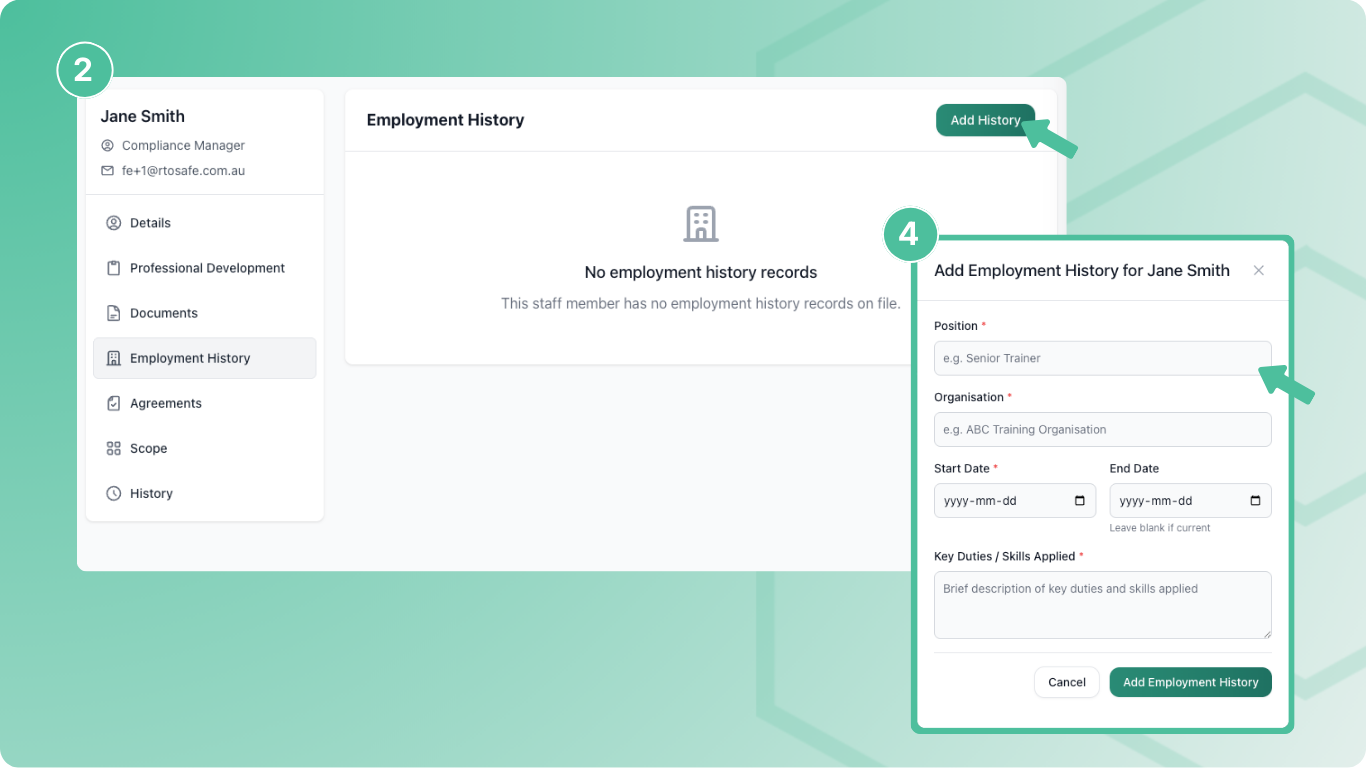
Go to a staff member's profile and select **Employment History** from the sidebar. Select **Add** and enter the organisation, position, key duties, and dates.
After creating the record, use **Map Scope** to link it to specific training products. This connects the work experience to units or qualifications the staff member can deliver.
***
## Verifying Employment History
Employment history must be verified before it appears in the Trainer Matrix. Unverified records show a "Not Verified" badge.
To verify a record, select **Verify Record** and choose how you verified the employment:
* **Reference check** — you contacted the employer or a referee
* **Employment verification letter** — you received written confirmation
* **Online verification** — you verified through an online service
* **Other** — another method (describe in notes)
Add notes about what you checked and optionally attach evidence like a reference letter or verification email.
Verified records are locked from editing. If you need to make changes, remove the verification first, update the record, then verify again.
***
## Attaching Evidence
Use **Attach Document** to upload supporting evidence — employment contracts, reference letters, or other proof of employment. These documents become part of the staff member's compliance evidence.
***
## Employment History vs Working in Industry PD
RTOSafe has two ways to record industry work:
* **Employment History** — past and ongoing employment, the full work history record
* **Working in Industry PD Activity** — recent industry engagement logged as professional development
Both can be mapped to training scope and appear in the Trainer Matrix. Use employment history for the complete picture, and PD activities to track ongoing industry currency.