# Record PD Activities
PD activities are the training, industry work, research, and other professional development your staff complete. Recording these activities builds evidence for compliance and tracks progress against PD requirements.
***
## Adding a PD Activity
1
Go to [**Staff**](https://app.rtosafe.com.au/Staff) and open the staff member's profile
2
Select **Professional Development** from the sidebar
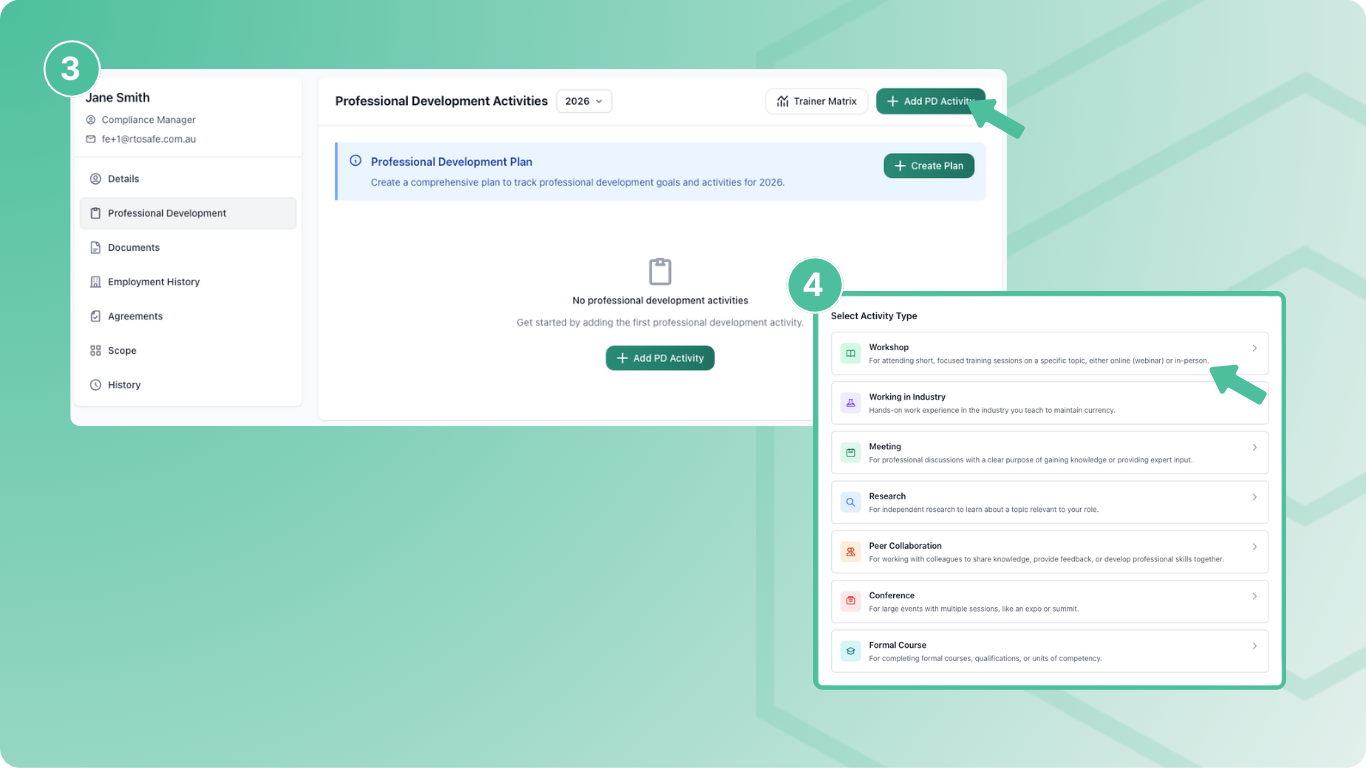
3
Select **Add PD Activity**
4
Choose the activity type (Workshop, Conference, Working in Industry, etc.)
5
Fill in the activity details and select **Create**
***
## Required Information
Activities need at least one **Competency Area** — this links the hours to your requirements. Duration uses decimals (0.5 = 30 minutes).
***
## Uploading Evidence
Use the **Evidence** section to attach supporting documents — certificates, attendance records, or other proof of completion. You can upload multiple files per activity.
***
## Linking to Units
After creating an activity, use **Map Scope** to link it to specific training units. This is important if you have unit-based PD requirements — hours only count toward a requirement when the activity is linked to the relevant units.
If you only use competency area requirements (not unit-based), you can skip scope mapping.
***
## What Happens Next
* New activities are set to `Requires Approval`
* A compliance task is created for someone to review and approve
* Once approved, hours count toward PD requirements
* Results update overnight or when you recalculate from the PD Requirements report
***
## Staff Self-Service
Staff members can record their own PD activities through the Staff Portal. They log in, go to **My Professional Development**, and add activities the same way. These still require manager approval before counting toward requirements.