
Recording PD Activities
PD activities are the training, industry work, research, and other professional development your staff complete. Recording them builds a PD record you can stand behind at audit. Every new activity is reviewed before it counts toward plans and currency — see Approving PD Activities.
Adding a PD Activity
Go to Staff and open the staff member’s profile
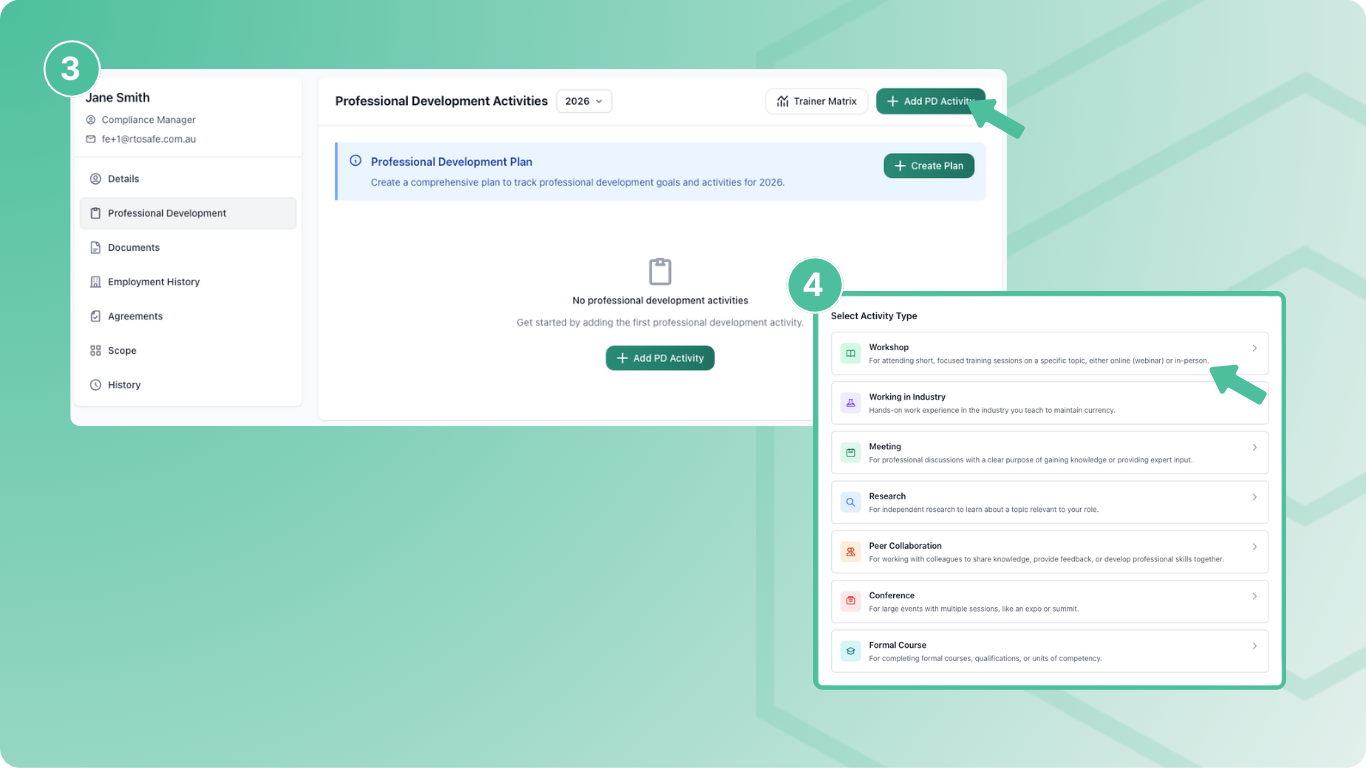
Select Professional Development from the sidebar
Select Add PD Activity
Choose the activity type (Workshop, Conference, Working in Industry, etc.)
Fill in the activity details and select Create
Required Information
Activities need at least one Competency Area — this links the hours to your requirements. Duration uses decimals (0.5 = 30 minutes).
Uploading Evidence
Use the Evidence section to attach supporting documents — certificates, attendance records, or other proof of completion. You can upload multiple files per activity.
Linking to Units
After creating an activity, use Map Scope to link it to the training units it supports. Industry currency is checked unit by unit, so an activity only counts toward a unit’s currency — and shows in the Trainer Matrix — when it’s mapped to that unit.
Training & Assessment PD counts toward VET currency through its competency area, so it doesn’t need to be mapped to units.
Staff Self-Submission
Staff can record their own activities in the Staff Portal under My Professional Development, upload evidence, and link each one to a goal in their plan. See Add a PD Activity.
Deleting an Activity
If an activity was added by mistake or doubled up, you can delete it:
Open the activity from the staff member’s Professional Development page and select Edit
Select Delete, then confirm with Delete activity
The activity is removed from the staff member’s PD record and no longer counts toward their plan, currency or reports. If it was linked to a goal, the goal is freed up so a new activity can be recorded against it. The deletion is recorded in the activity’s history.
Deleted activities can’t be restored. If an activity just needs fixing, use Request changes so the staff member can update it instead. See Approving PD Activities.
Only admins with Read/Write access can delete activities. Staff can’t delete them from the Staff Portal.
Common Issues
The goal I want isn't in the list
The optional Professional Development Goal list only shows specific activities from active plans for this year or last year that aren’t already linked to another activity. Annual targets aren’t listed because they don’t need linking — approved activities count toward them automatically.
A staff member needs to change an approved activity
Staff can’t edit an activity once it’s approved. You can edit it yourself, or select Reset Approval to send it back to Waiting for Approval so they can update and resubmit it. See Approving PD Activities.
PD isn't counting toward currency or showing in the Trainer Matrix
Check the activity is approved and mapped to the unit with Map Scope. See Setting Trainer Currency Benchmarks for more.